AI chatbots aren’t just for big companies with their own IT teams anymore. With n8n, you can build a simple AI chatbot for your small business without writing code from scratch. This chatbot can answer customer questions automatically, any time of day, so you don’t have to sit glued to your phone just to reply to the same questions over and over.
In this article, we’ll walk through how to build an AI chatbot with n8n step by step, from setup to a chatbot that’s ready to serve customers.
Why n8n Works Well for Small Business AI Chatbots
n8n is a visual automation tool, so you drag and drop nodes on a canvas instead of writing long lines of code. For a small business, that matters because you usually don’t have a dedicated developer on standby. n8n can also connect to many channels at once, from a chat widget on your website to WhatsApp and Telegram. Cost-wise, it’s far cheaper than hiring a custom developer or paying for a monthly chatbot SaaS subscription.
Real-World Uses for an AI Chatbot in Small Business
Before diving into the technical steps, it helps to picture how this actually gets used. An online store can use an AI chatbot to answer questions about sizing, stock, or shipping status without an admin replying to every message one by one. A service business, like a salon or a repair shop, can use a chatbot to handle bookings automatically and share basic pricing. Even a home-based food business can use a chatbot to take simple orders outside business hours, so potential customers don’t wander off to a competitor just because they waited too long for a reply.
What You Need Before You Start
Before building your AI chatbot with n8n, get these three things ready:
- An n8n account — you can use n8n Cloud (easiest, just sign up) or self-host it on your own server if you want to save money long-term. Check docs.n8n.io if any term feels unfamiliar.
- An API key from an AI provider — OpenAI is the most common choice, but n8n also supports Google Gemini, Anthropic, and other models through Groq.
- A channel for the chatbot to live in — a chat widget on your website, WhatsApp Business, or Telegram, depending on where your customers usually reach out to you.
Step by Step: Building an AI Chatbot in n8n
1. Create a New Workflow and Add a Chat Trigger
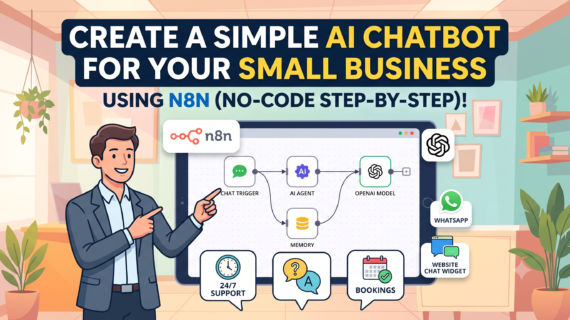
In your n8n dashboard, click “New Workflow” and add a Chat Trigger node. This node is the entry point every time a new message comes in from a customer — think of it as the receptionist who greets every visitor the moment they walk in.
2. Connect an AI Agent Node
Once the Chat Trigger is in place, add an AI Agent node and connect it to the trigger. The AI Agent is the brain of your chatbot — the part that actually composes an answer, rather than just sending a canned template reply.
3. Choose Your AI Model
Inside the AI Agent, connect a Chat Model, such as OpenAI Chat Model. Add your API key and pick a model. If you’re just starting out and want to keep costs low, a lighter or mini model is usually enough to handle questions about your products and services.
4. Add Memory So the Chatbot Remembers the Conversation
Without memory, your chatbot forgets what was just discussed the moment a customer sends a second message. Add a Simple Memory node and connect it to the AI Agent so the chatbot can follow a conversation naturally, the way a real person would.
5. Set the System Prompt
This is the part that shapes your chatbot’s quality the most. In the system prompt field, clearly state who this chatbot is, what product or service it represents, and what topics it’s allowed to cover. The more specific the instructions, the less likely your chatbot is to wander off-topic or make things up.
6. Test It Directly in n8n
Click the chat button on the n8n canvas to talk to your chatbot before it goes live for customers. Try a few common questions your customers usually ask, and check whether the answers actually fit your business.
7. Activate and Connect to Your Channel
Once you’re happy with the results, activate the workflow and connect it to the channel you picked earlier — a small script for a website chat widget, or a webhook for WhatsApp/Telegram. Your AI chatbot is now ready to serve customers without you having to watch over it constantly.
How Much Does It Cost to Build an AI Chatbot with n8n?
This is the question people ask most, and the good news is the cost is much lower than a custom-built chatbot from a developer or a monthly SaaS subscription. On n8n Cloud, you just pay for your n8n plan. Self-hosted, it can be nearly free as long as you have a small server to run n8n on. The only extra cost to factor in is API usage from your AI provider, which is usually billed per use — so it stays small early on while your customer chat volume is still low.
Tips to Make Your AI Chatbot Even More Helpful
Don’t stop at the initial setup. Review conversation transcripts regularly to spot questions that keep coming up but aren’t being answered well, then refine the system prompt over time. If your business has product info or an FAQ list that changes often, consider connecting the chatbot to a spreadsheet or database through an extra tool, so answers stay current without manually editing the prompt every time a price or stock level changes.
One more thing that’s easy to overlook: build in a path to a human. An AI chatbot is smart, but sometimes a customer has a case that’s too specific or needs a judgment call it can’t make on its own. In the system prompt, add an instruction telling the chatbot to point customers to a WhatsApp number or support team when a question falls outside what it can handle. That way, your AI chatbot still feels helpful instead of leaving customers stuck in a loop.
Wrapping Up
Building an AI chatbot with n8n really isn’t as hard as it looks, especially once you understand what each node does. Start with the simplest version first, then build it out gradually as your business needs grow. If anything trips you up along the way, drop a comment below!